


Τα μπιφτέκια είναι προσωπικά. Έξτρα μπέικον, χωρίς κρεμμύδια, ελβετικό αντί για τσένταρ, και -αν δώσετε στους πελάτες σας τη δυνατότητα επιλογής, οι περισσότεροι θα πουν ναι στις πατάτες και στο ποτό, αν τους διευκολύνετε. Η ενσωμάτωσή μας με το πρόσθετο WooCommerce Product Add-Ons καθιστά αυτό το επίπεδο εξατομίκευσης αβίαστο τόσο για online όσο και για προσωπικές παραγγελίες.
Πώς λειτουργεί ένα σύστημα παραγγελίας εστιατορίου Burger με το FooSales και το WooCommerce;
Το σύστημα παραγγελιών επιτρέπει στους πελάτες να κάνουν παραγγελίες online ή αυτοπροσώπως. Χρησιμοποιώντας WordPress, WooCommerce και FooSales, περιλαμβάνει:
- Διαδικτυακή βιτρίνα: Οι πελάτες περιηγούνται σε ένα ηλεκτρονικό μενού προϊόντων, προσθέτουν μπιφτέκια στο καλάθι και προσαρμόζουν τις γαρνιτούρες (π.χ. επιπλέον τυρί, χωρίς κρεμμύδια) χρησιμοποιώντας το WooCommerce Add-Ons προϊόντων επέκταση. Το σύστημα παρακολουθεί τα στοιχεία και υπολογίζει το κόστος.
- Λογαριασμός χρήστη ή ταμείο επισκεπτών: Οι πελάτες δημιουργούν έναν λογαριασμό για να αποθηκεύουν το ιστορικό και τις προτιμήσεις των παραγγελιών ή να χρησιμοποιούν το checkout επισκεπτών για ευκολία.
- Επιλογή παράδοσης ή παραλαβής: Οι πελάτες επιλέγουν παράδοση σε μια διεύθυνση ή παραλαβή στο κατάστημα.
- Επεξεργασία πληρωμών: Ασφαλείς πύλες πληρωμών χειρίζονται πιστωτικές/χρεωστικές κάρτες, ψηφιακά πορτοφόλια (π.χ. PayPal) ή αντικαταβολή.
- Επιβεβαίωση παραγγελίας: Μετά την πληρωμή, οι πελάτες λαμβάνουν ένα email ή μια ειδοποίηση με τις λεπτομέρειες της παραγγελίας και τον εκτιμώμενο χρόνο παραλαβής/παράδοσης.
- Διαχείριση παραγγελιών: Οι παραγγελίες αποστέλλονται στο back-end WooCommerce του εστιατορίου και φορτώνονται επίσης στο FooSales για να τις επεξεργαστεί το προσωπικό.
- Εκπλήρωση παραγγελιών: Το προσωπικό της κουζίνας προετοιμάζει τις παραγγελίες και οι οδηγοί παράδοσης ανατίθενται για τις παραγγελίες παράδοσης.
- Παρακολούθηση παραγγελιών: Οι πελάτες μπορούν να παρακολουθούν την κατάσταση της παραγγελίας (π.χ. προετοιμασία, ετοιμότητα ή παράδοση) σε πραγματικό χρόνο.
- Παράδοση ή παραλαβή: Οι παραγγελίες παραδίδονται στην καθορισμένη διεύθυνση ή παραλαμβάνονται από το εστιατόριο.
- Ιστορικό παραγγελιών και διαχείριση λογαριασμών: Οι πελάτες έχουν πρόσβαση σε προηγούμενες παραγγελίες και διαχειρίζονται τις ρυθμίσεις του λογαριασμού.
- Ανάλυση και υποβολή εκθέσεων: Το σύστημα παρέχει δεδομένα για τη διαχείριση των αποθεμάτων, την παρακολούθηση των πωλήσεων και τη βελτίωση των υπηρεσιών.
Ρύθμιση του συστήματος παραγγελίας του εστιατορίου Burger σας
Αυτός ο οδηγός χρησιμοποιεί WordPress, WooCommerce, FooSales, και το WooCommerce Add-Ons προϊόντων επέκταση για τη δημιουργία ενός οικονομικώς αποδοτικού συστήματος παραγγελιών. Το WooCommerce, μια πλατφόρμα ηλεκτρονικού εμπορίου WordPress, χειρίζεται τις ηλεκτρονικές παραγγελίες, ενώ το FooSales ενσωματώνει τις προσωπικές και τις ηλεκτρονικές παραγγελίες μέσω ενός συστήματος POS. Η επέκταση WooCommerce Product Add-Ons (Προσθήκες προϊόντων) επιτρέπει την προσαρμογή των επικαθήσεων των μπιφτεκιών. Ακολουθεί ο τρόπος ρύθμισής της:
1. Ξεκινώντας με το WordPress και το WooCommerce
Αν είστε νέοι στο WordPress ή στο WooCommerce, ακολουθήστε αυτό οδηγός για να δημιουργήσετε τον ιστότοπό σας σε λίγα εύκολα βήματα. Μόλις ο ιστότοπός σας είναι έτοιμος, προχωρήστε στην επόμενη ενότητα.
2. Δημιουργία προϊόντων

Κάθε στοιχείο του μενού, όπως ένα τσίζμπεργκερ ή πατάτες τηγανιτές, προστίθεται ως προϊόν WooCommerce. Για να οργανώσετε το μενού σας, δημιουργήστε κατηγορίες προϊόντων:
- Πηγαίνετε στο Προϊόντα > Κατηγορίες στο ταμπλό του WordPress
- Κάντε κλικ στο Προσθήκη νέου για να δημιουργήσετε κατηγορίες όπως “Burgers”, “Συνοδευτικά” και “Ποτά”.”
Στη συνέχεια, προσθέστε προϊόντα:
- Πλοηγηθείτε στο Προϊόντα > Προσθήκη νέου στο ταμπλό διαχείρισης του WooCommerce.
- Εισάγετε το Τίτλος (π.χ. “Classic Cheeseburger”), Μεγάλη περιγραφή (π.χ., λεπτομέρειες για τα μπιφτέκια), Δεδομένα προϊόντος (π.χ. τιμή), Σύντομη περιγραφή, Κατηγορίες προϊόντων, και Εικόνα προϊόντος.
- Κάντε κλικ στο Δημοσίευση για να προσθέσετε το προϊόν. Επαναλάβετε για όλα τα στοιχεία του μενού.
3. Διαμόρφωση των πρόσθετων προϊόντων WooCommerce
Για να ενεργοποιήσετε τις παραμετροποιήσιμες γαρνιτούρες burger, εγκαταστήστε το Επέκταση WooCommerce Product Add-Ons (συμβατό με την έκδοση FooSales για το διαδίκτυο). Αυτό επιτρέπει στους πελάτες να εξατομικεύσουν τα μπιφτέκια τους.

Δημιουργήστε ένα Παγκόσμια πρόσθετα για τις γαρνιτούρες του μπιφτεκιού σας και αναθέστε το στο Burgers κατηγορία προϊόντων. Με αυτόν τον τρόπο, οι ίδιες επιλογές γαρνιτούρας (π.χ. επιπλέον τυρί, jalapeños, μπέικον) εμφανίζονται αυτόματα σε κάθε προϊόν μπιφτεκιού χωρίς να χρειάζεται να ρυθμίσετε τις παραμέτρους κάθε μπιφτεκιού. Είναι ο γρηγορότερος τρόπος για να διατηρήσετε το μενού σας συνεπές και να ενημερώσετε τις τιμές ή τις επιλογές σε ένα μέρος.

Εάν ένα συγκεκριμένο μπιφτέκι χρειάζεται μοναδικές επιλογές, προσθέστε ένα Πρόσθετα ανά προϊόν ομάδα για το εν λόγω προϊόν. Χρησιμοποιήστε το για να προσθέσετε ή να βελτιώσετε τις επιλογές μόνο για το συγκεκριμένο προϊόν - για παράδειγμα, μια λίστα με πλαίσιο ελέγχου “Εξαίρεση των toppings για αυτό το μπιφτέκι” για να αφαιρέσετε τα συστατικά που περιλαμβάνονται στο βασικό εξοπλισμό αυτής της κατασκευής. Οι σφαιρικές και οι πρόσθετες επιλογές ανά προϊόν συνεργάζονται, ώστε να έχετε ευρεία κάλυψη σε όλη την κατηγορία καθώς και λεπτομερή έλεγχο όπου τον χρειάζεστε.
Το WooCommerce Product Add-Ons υποστηρίζει την εισαγωγή και εξαγωγή παγκόσμιων πρόσθετων μέσω αρχείων JSON. Αυτό είναι ιδιαίτερα χρήσιμο για τη δοκιμή ή την αντιγραφή των ρυθμίσεων των πρόσθετων σε διάφορα καταστήματα. Παρακάτω παρατίθενται δύο δείγματα αρχείων JSON που μπορείτε να χρησιμοποιήσετε για να ρυθμίσετε τις τυπικές προσθήκες burger και να τις τροποποιήσετε για το κατάστημά σας:
[ { "name": "Bun", "title_format": : 0, "description": "", "placeholder_enable": 0, "placeholder": "", "type": "multiple_choice", "display": "radiobutton", "position": 0, "required": 1, "restrictions": 0, "restrictions_type": 0, "price_type": Τιμή": "flat_fee", "price": "", "id": "1757422001", "min": 0, "max": 0, "default": 0, "options": [ { "label": "Standard", "price": "", "image": "", "price_type": "price_fee", "visibility": 1 }, { "label": "Sesame", "price": "", "image": "", "price_type": "flat_fee", "visibility": 1 }, { "label": "Brioche", "price": "5", "image": "", "price_type": "flat_fee", "visibility": 1 }, { "label": "Gluten Free", "price": "10", "image": "", "price_type": "flat_fee", "visibility": 1 }, { "label": (χωρίς ψωμάκι)", "price": "Lettuce Wrap (χωρίς ψωμάκι)", "price": "Lettuce Wrap (χωρίς ψωμάκι)": "", "image": "", "price_type": "flat_fee", "visibility": 1 } ] }, { "name": : 0, "description": "", "placeholder_enable": 0, "placeholder": "", "type": "multiple_choice", "display": "radiobutton", "position": 1, "required": 1, "restrictions": 0, "restrictions_type": (περιορισμοί_τιμής): "περιορισμοί_τιμής", "περιορισμοί_τιμής": "any_text", "adjust_price": "adjustment_price": 0, "price_type": Τιμή": "flat_fee", "price": "", "id": "1757422002", "min": 0, "max": 0, "default": 0, "options": [ { "label": "Single Patty", "price": "", "image": "", "price_type": "price_fee", "visibility": 1 }, { "label": "Double Patty", "price": "35", "image": "", "price_type": "flat_fee", "visibility": 1 }, { "label": Τιμή": "Triple Patty", "price": "70", "image": "", "price_type": "flat_fee", "visibility": 1 } ] }, { "name": "Doneness", "title_format": "description_enable": 0, "description": "", "placeholder_enable": 0, "placeholder": "", "type": "multiple_choice", "display": "radiobutton", "position": 2, "required": 1, "restrictions": 0, "restrictions_type": (περιορισμοί_τιμής): "περιορισμοί_τιμής", "περιορισμοί_τιμής": "any_text", "adjust_price": "adjustment_price": 0, "price_type": Τιμή": "flat_fee", "price": "", "id": "1757422003", "min": 0, "max": 0, "default": 0, "options": [ { "label": "Rare", "price": "", "image": "", "price_type": "price_fee", "visibility": 1 }, { "label": "Medium Rare", "price": "", "image": "", "price_type": "flat_fee", "visibility": 1 }, { "label": "Medium", "price": "", "image": "", "price_type": "flat_fee", "visibility": 1 }, { "label": "Medium Well", "price": "", "image": "", "price_type": "flat_fee", "visibility": 1 }, { "label": "Well Done", "price": "", "image": "", "price_type": "flat_fee", "visibility": 1 } ] }, { "name": "Cheese", "title_format": : 0, "description": "", "placeholder_enable": 0, "placeholder": "", "type": "multiple_choice", "display": "radiobutton", "position": 3, "required": 1, "restrictions": 0, "restrictions_type": (περιορισμοί_τιμής): "περιορισμοί_τιμής", "περιορισμοί_τιμής": "any_text", "adjust_price": "adjustment_price": 0, "price_type": Τιμή": "flat_fee", "price": "", "id": "1757422004", "min": 0, "max": 0, "default": 0, "options": [ { "label": "No Cheese", "price": "", "image": "", "price_type": "price_fee", "visibility": 1 }, { "label": "Cheddar", "price": "10", "image": "", "price_type": "flat_fee", "visibility": 1 }, { "label": "Swiss", "price": "12", "image": "", "price_type": "flat_fee", "visibility": 1 }, { "label": "American", "price": "8", "image": "", "price_type": "flat_fee", "visibility": 1 }, { "label": : "15", "image": "", "price_type": "flat_fee", "visibility": 1 } ] }, { "name": Ονομασία: "Extra Meat Toppings", "title_format": : 0, "description": 0, "placeholder": "", "type": "checkbox", "display": "select", "position": 4, "required": 0, "restrictions": 0, "restrictions_type": "adjustment_price": 0, "price_type": Τιμή": "flat_fee", "price": "", "id": "1757422005", "min": 0, "max": 0, "default": "", "options": [ { "label": "Crispy bacon", "price": "18", "image": "", "price_type": "price_fee", "visibility": 1 }, { "label": "Τηγανητό αυγό", "price": "12", "image": "", "price_type": "flat_fee", "visibility": 1 }, { "label": "Extra beef patty", "price": "35", "image": "", "price_type": "flat_fee", "visibility": 1 }, { "label": : "20", "image": "", "price_type": "flat_fee", "visibility": 1 }, { "label": "Pulled pork", "price": "22", "image": "", "price_type": "flat_fee", "visibility": 1 } ] }, { "name": "Extra Veggie Toppings", "title_format": : 0, "description": 0, "placeholder": "", "type": "checkbox", "display": "select", "position": 5, "required": 0, "restrictions": 0, "restrictions_type": "adjustment_price": 0, "price_type": Τιμή": "flat_fee", "price": "", "id": "1757422006", "min": 0, "max": 0, "default": "", "options": [ { "label": "Lettuce", "price": "", "image": "", "price_type": "price_fee", "visibility": 1 }, { "label": "Τομάτα", "price": "", "image": "", "price_type": "flat_fee", "visibility": 1 }, { "label": "Pickles", "price": "", "image": "", "price_type": "flat_fee", "visibility": 1 }, { "label": "Κρεμμύδια (ακατέργαστα)", "price": "", "image": "", "price_type": "flat_fee", "visibility": 1 }, { "label": "Caramelized onions", "price": "5", "image": "", "price_type": "flat_fee", "visibility": 1 }, { "label": "Χαλαπάνια / τσίλι", "price": "5", "image": "", "price_type": "price_fee", "visibility": 1 }, { "label": "Μανιτάρια", "price": "8", "image": "", "price_type": "price_fee", "visibility": 1 }, { "label": "Αβοκάντο", "price": "18", "image": "", "price_type": "flat_fee", "visibility": 1 } ] }, { "name": "Σάλτσες", "title_format": "description_enable": 0, "description": "", "placeholder_enable": 0, "placeholder": "", "type": "checkbox", "display": "select", "position": 6, "required": 0, "restrictions": 0, "restrictions_type": "adjustment_price": 0, "price_type": Τιμή": "flat_fee", "price": "", "id": "1757422007", "min": 0, "max": 0, "default": "", "options": [ { "label": "Ketchup", "price": "", "image": "", "price_type": "price_fee", "visibility": 1 }, { "label": "Μουστάρδα", "price": "", "image": "", "price_type": "flat_fee", "visibility": 1 }, { "label": "Mayonnaise", "price": "", "image": "", "price_type": "flat_fee", "visibility": 1 }, { "label": "BBQ sauce", "price": "5", "image": "", "price_type": "flat_fee", "visibility": 1 }, { "label": Σκόρδο αϊόλι", "price": "Garlic aioli", "price": "Garlic aioli": "5", "image": "", "price_type": "flat_fee", "visibility": 1 }, { "label": "Peri-Peri", "price": "5", "image": "", "price_type": "flat_fee", "visibility": 1 } ] }, { "name": "Extras", "title_format": "description_enable": "description_enable": "description_enable": 0, "description": "", "placeholder_enable": 0, "placeholder": "", "type": "checkbox", "display": "select", "position": 7, "required": 0, "restrictions": 0, "restrictions_type": "adjustment_price": 0, "price_type": Τιμή": "flat_fee", "price": "", "id": "1757422008", "min": 0, "max": 0, "default": "", "options": [ { "label": "Extra cheese slice", "price": "15", "image": "", "price_type": "price_fee", "visibility": 1 }, { "label": "Extra pickles", "price": "3", "image": "", "price_type": "flat_fee", "visibility": 1 }, { "label": "Extra sauce", "price": "3", "image": "", "price_type": "flat_fee", "visibility": 1 } ] }, { "name": (Αφαίρεση)", "title_format": "title_format": "description_enable": 0, "description": 0, "placeholder": "", "type": "checkbox", "display": "select", "position": 8, "required": 0, "restrictions": 0, "restrictions_type": "adjustment_price": 0, "price_type": Τιμή": "flat_fee", "price": "", "id": "1757422009", "min": 0, "max": 0, "default": "", "options": [ { "label": "No lettuce", "price": "", "image": "", "price_type": "price_fee", "visibility": 1 }, { "label": "Δεν υπάρχει ντομάτα", "price": "", "image": "", "price_type": "flat_fee", "visibility": 1 }, { "label": "No onions", "price": "", "image": "", "price_type": "flat_fee", "visibility": 1 }, { "label": "No pickles", "price": "", "image": "", "price_type": "flat_fee", "visibility": 1 }, { "label": "No sauce", "price": "", "image": "", "price_type": "flat_fee", "visibility": 1 } ] } ]
4. Ενεργοποίηση επιλογών παραλαβής και παράδοσης
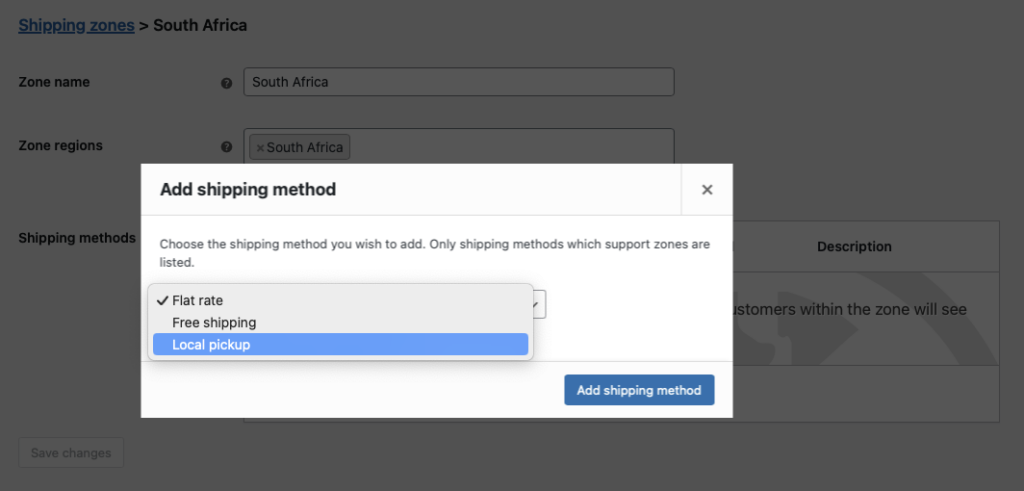
Επιτρέψτε στους πελάτες να επιλέξουν παραλαβή ή παράδοση στο ταμείο χρησιμοποιώντας μεθόδους αποστολής WooCommerce:
- Στο ταμπλό του WordPress, μεταβείτε στη διεύθυνση WooCommerce > Ρυθμίσεις > Αποστολή και κάντε κλικ στο Προσθήκη ζώνης αποστολής.
- Εισάγετε ένα Όνομα ζώνης (π.χ. “Τοπική περιοχή”) και καθορίστε την περιοχή του εστιατορίου σας.
- Προσθέστε Τοπική παραλαβή ως μέθοδος αποστολής για συλλογή στο κατάστημα.
- Για παράδοση, επιλέξτε Δωρεάν αποστολή ή Κατ' αποκοπή συντελεστής (π.χ., μετονομάστε το Flat Rate σε “Local Delivery” και ορίστε μια αμοιβή $5).
5. Διαμόρφωση προσαρμοσμένων καταστάσεων παραγγελίας

Παρακολουθήστε την πρόοδο της παραγγελίας με προσαρμοσμένες καταστάσεις χρησιμοποιώντας ένα δωρεάν πρόσθετο προσαρμοσμένης κατάστασης παραγγελίας (π.χ. Ni WooCommerce Προσαρμοσμένη προσθήκη κατάστασης παραγγελίας). Εγκαταστήστε το και δημιουργήστε καταστάσεις όπως:
- Ενεργό: Η παραγγελία ετοιμάζεται στην κουζίνα.
- Έτοιμο: Η παραγγελία είναι έτοιμη για παραλαβή ή παράδοση.
- Πλήρης: Η παραγγελία έχει εκτελεστεί και δεν απαιτείται περαιτέρω ενέργεια.
- Πλοηγηθείτε στο Κατάσταση παραγγελίας > Προσθήκη νέου για να τις ρυθμίσετε.
6. Ρύθμιση αυτοματοποιημένων μηνυμάτων ηλεκτρονικού ταχυδρομείου και SMS πελατών (προαιρετικά)
Στη συνέχεια, μπορείτε να στέλνετε αυτοματοποιημένες ενημερώσεις στους πελάτες σας όταν αλλάζει η κατάσταση της παραγγελίας, χρησιμοποιώντας την επιλογή Πρόσθετο AutomateWoo επέκταση. Αυτό μπορεί να χρησιμοποιηθεί για να τους ενημερώσει ότι η παραγγελία είναι έτοιμη για παραλαβή ή για παράδοση.
Όταν αλλάζει η κατάσταση μιας παραγγελίας, μπορείτε να ρυθμίσετε AutomateWoo θα στείλει ένα email στον πελάτη. Μπορείτε να ρυθμίσετε διάφορα μηνύματα ηλεκτρονικού ταχυδρομείου που ενεργοποιούνται από διαφορετικές καταστάσεις παραγγελίας και μπορείτε επίσης να εφαρμόσετε πρόσθετους κανόνες ώστε τα μηνύματα ηλεκτρονικού ταχυδρομείου να αποστέλλονται μόνο όταν πληρούνται ορισμένες προϋποθέσεις.
Ακολουθούν μερικά παραδείγματα των τύπων αυτοματοποίησης που μπορείτε να εφαρμόσετε χρησιμοποιώντας ενεργοποιητές και κανόνες:
Παραγγελία που ετοιμάζεται email
Όταν έρχεται μια παραγγελία, η κουζίνα τη σηματοδοτεί Ενεργό για να δείξετε ότι η προετοιμασία έχει ξεκινήσει στο σύστημα παραγγελιών σας. Διαμόρφωση AutomateWoo να στείλετε μήνυμα ηλεκτρονικού ταχυδρομείου στον πελάτη σχετικά με την αλλαγή κατάστασης, επιβεβαιώνοντας ότι η κουζίνα εργάζεται για την παραγγελία του. Αυτό δημιουργεί προσδοκίες και τους κρατά ενήμερους για την πρόοδο.

Παραγγελία έτοιμη για παραλαβή email
Στείλτε αυτό το email μόνο για παραγγελίες τοπικής παραλαβής. Στο AutomateWoo, προσθέστε έναν κανόνα όπου Παραγγελία → Μέθοδος αποστολής = Τοπική παραλαβή έτσι ώστε η ροή εργασίας να ενεργοποιείται μόνο σε αυτές τις περιπτώσεις.
Η παραγγελία είναι καθ' οδόν email
Στείλτε αυτό το email μόνο για παραγγελίες παράδοσης. Στο AutomateWoo, προσθέστε ένα Κανόνας: Παραγγελία → Μέθοδος αποστολής είναι Κατ' αποκοπή συντελεστής Ή Δωρεάν αποστολή (π.χ., “είναι ένα από τα εξής: Κατ” αποκοπήν τιμή, Δωρεάν αποστολή").
Ευχαριστήριο email
Αφού η παραγγελία επισημανθεί ως Ολοκληρωμένη, στείλτε ένα ευχαριστήριο email με έναν κωδικό κουπονιού για να προωθήσετε επαναλαμβανόμενες πωλήσεις.
Χρονοδιάγραμμα/προγραμματισμός
Σε όλα τα παραπάνω παραδείγματα, μπορείτε να αφήσετε το Χρονισμός ρύθμιση σε Τρέξτε αμέσως εκτός αν θέλετε να εφαρμόσετε μια μικρή καθυστέρηση, η οποία θα σας δώσει χρόνο να ακυρώσετε την αποστολή ενός ηλεκτρονικού μηνύματος εάν η κατάσταση της παραγγελίας άλλαξε λανθασμένα.

Δράσεις
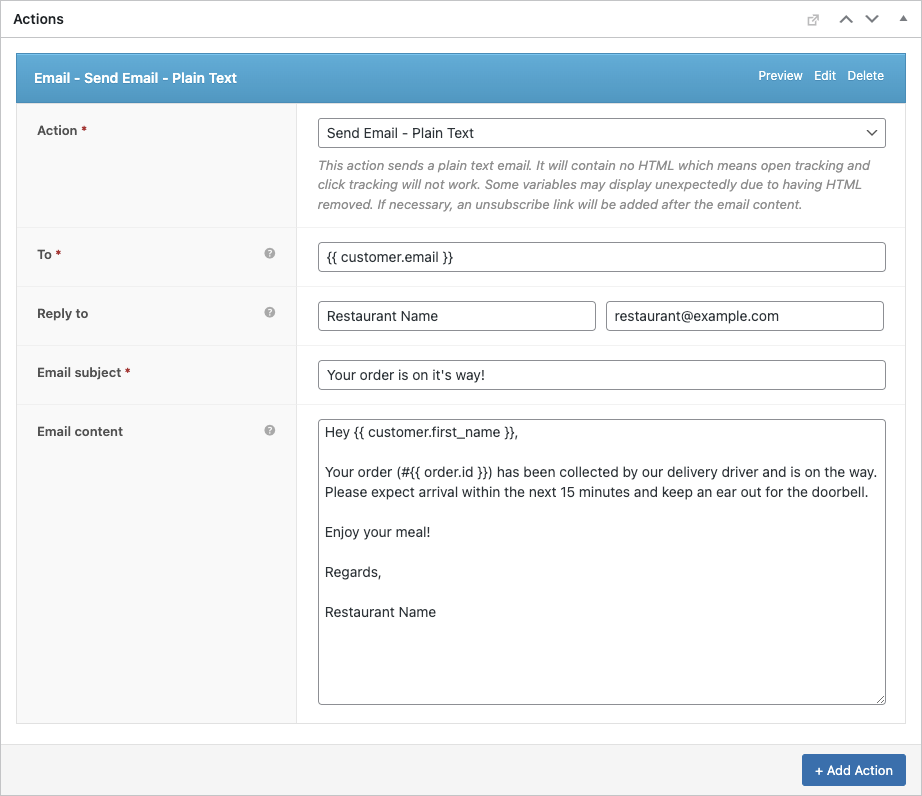
Για κάθε email θα πρέπει να ρυθμίσετε ένα email ή SMS μήνυμα κειμένου.
- Στη ροή εργασίας σας, ανοίξτε Ενέργειες → Προσθήκη ενέργειας.
- Επιλέξτε Στείλτε email (ή Αποστολή SMS αν χρησιμοποιείτε SMS).
- Ορίστε Προς στο
{{ customer.email }}έτσι πηγαίνει στον αγοραστή. - Συμπληρώστε το Θέμα και Περιεχόμενο ηλεκτρονικού ταχυδρομείου (χρησιμοποιήστε ετικέτες συγχώνευσης όπως απαιτείται).
- Αποθήκευση τη δράση.
Αν στέλνετε SMS, επιλέξτε Αποστολή SMS και ρυθμίστε τον παραλήπτη/το μήνυμα σύμφωνα με τις ρυθμίσεις του SMS σας.
Ακολουθεί ένα παράδειγμα:
Με την πάροδο του χρόνου, αυτό θα εξοικονομήσει αμέτρητες ώρες και θα ελαχιστοποιήσει τον κίνδυνο λάθους. Μπορείτε επίσης να ρυθμίσετε AutomateWoo να στέλνετε SMS χρησιμοποιώντας Twilio το οποίο είναι ένα άλλο σπουδαίο χαρακτηριστικό αυτού του σύστημα παραγγελιών εστιατορίου.
6. Ρύθμιση FooSales POS
Το FooSales θα λειτουργήσει χωρίς καμία προσαρμοσμένη διαμόρφωση, ωστόσο θα πρέπει να ρυθμίσετε ποιες καταστάσεις παραγγελίας θα πρέπει να φορτώνει το FooSales. Ανοίξτε το FooSales → Ρυθμίσεις → Παραγγελίες και προσθέστε τις προσαρμοσμένες καταστάσεις σας στο Καταστάσεις παραγγελίας για φόρτωση ώστε να εμφανίζονται στις εφαρμογές POS. Ορίστε το Κατάσταση υποβολής παραγγελιών για να ορίσετε ποια κατάσταση εφαρμόζεται στο ταμείο και να επιλέξετε ποιες καταστάσεις μετράνε ως Ελλιπείς καταστάσεις παραγγελιών.

Μπορείτε επίσης να ρυθμίσετε το FooSales να εμφανίζει ειδοποιήσεις παραγγελιών με βάση την κατάσταση της παραγγελίας ή τη μέθοδο αποστολής που σχετίζεται με μια παραγγελία. Οι ειδοποιήσεις παραγγελιών θα διασφαλίσουν ότι το προσωπικό του ορόφου ή της κουζίνας θα ενημερωθεί για τις νέες παραγγελίες και θα είναι σε θέση να τις εκτελέσει χωρίς καθυστέρηση χάρη στο σύστημα παραγγελίας εστιατορίου.

Χρησιμοποιώντας το σύστημα παραγγελίας του εστιατορίου Burger σας
Δείτε πώς μπορείτε να διαχειρίζεστε online και προσωπικές παραγγελίες με το σύστημά σας:
Διαδικτυακές παραγγελίες
- Όταν ένας πελάτης παραγγέλνει ένα εξατομικευμένο μπιφτέκι online, η παραγγελία εμφανίζεται στο FooSales POS με μια ειδοποίηση.
- Προβολή της παραγγελίας στο POS, συμπεριλαμβανομένων λεπτομερειών, όπως τα toppings (μέσω των Product Add-Ons), το αναγνωριστικό παραγγελίας, την κατάσταση, τη μέθοδο αποστολής και το συνολικό ποσό.
- Αλλάξτε την κατάσταση σε Ενεργό για να ξεκινήσει η προετοιμασία, ενεργοποιώντας το email/SMS “Order Being Prepared” (Παραγγελία ετοιμάζεται).
- Το προσωπικό της κουζίνας μπορεί να βλέπει τις λεπτομέρειες σε ένα tablet ή να εκτυπώνει ένα δελτίο παραγγελίας χρησιμοποιώντας την υποστήριξη θερμικού εκτυπωτή FooSales.
- Ενημέρωση σε Έτοιμο όταν ολοκληρωθεί, ειδοποιώντας τους πελάτες για παραλαβή ή παράδοση. Για τις παραδόσεις, οι οδηγοί χρησιμοποιούν τα στοιχεία της παραγγελίας για την εκτέλεση.
- Ρυθμίστε σε Πλήρης μόλις ο πελάτης παραλάβει την παραγγελία.
Εσωτερικές παραγγελίες

- Χρησιμοποιήστε το FooSales για να δημιουργήσετε προσωπικές παραγγελίες στο FooSales POS.
- Αναζήτηση προϊόντων (π.χ. “Double Cheeseburger”) ή σάρωση γραμμωτών κωδικών, με προσαρμογές κορυφής που συγχρονίζονται μέσω του WooCommerce Product Add-Ons.
- Προσθέστε αντικείμενα στο καλάθι, εφαρμόστε εκπτώσεις ή κουπόνια, συνδεθείτε με ένα προφίλ πελάτη και επιλέξτε μεθόδους πληρωμής στην οθόνη πληρωμής.
- Ορίστε την κατάσταση της παραγγελίας σε Επεξεργασία για να ειδοποιήσετε το προσωπικό της κουζίνας.
- Οι παραγγελίες αποθηκεύονται στο WooCommerce και η απογραφή ενημερώνεται αυτόματα.
Προβολή παραγγελιών

- Οι ηλεκτρονικές και προσωπικές παραγγελίες εμφανίζονται στον πίνακα εργαλείων WooCommerce στην ενότητα Παραγγελίες και στο τμήμα παραγγελιών του FooSales.
- Χρησιμοποιήστε αναφορές WooCommerce για αναλύσεις πωλήσεων και αποθεμάτων.
Συμπέρασμα
Η δημιουργία ενός συστήματος παραγγελιών με τις επεκτάσεις WordPress, WooCommerce, FooSales και Product Add-Ons παρέχει στο εστιατόριο μπέργκερ σας τη δυνατότητα να διαχειρίζεται αποτελεσματικά τις online και προσωπικές παραγγελίες. Αυτό το σύστημα βελτιστοποιεί την προσαρμογή, παρακολουθεί τις παραγγελίες και ενισχύει την ικανοποίηση των πελατών με ελάχιστο κόστος. Εγγραφείτε για ένα FooSales δωρεάν δοκιμή για να ξεκινήσετε και να βελτιστοποιήσετε τις λειτουργίες του εστιατορίου σας.