


Burgers are personal. Extra bacon, no onions, Swiss instead of cheddar, and—if you give your customers a choice, most will say yes to fries and a drink if you make it easy. Our integration with the WooCommerce Product Add-Ons plugin makes this level of personalization effortless for both online and in-person orders.
How Does a Burger Restaurant Ordering System Work with FooSales and WooCommerce?
The ordering system enables customers to place orders online or in-person. Using WordPress, WooCommerce, and FooSales, it includes:
- Montra online: Customers browse an online menu of products, add burgers to a cart, and customize toppings (e.g., extra cheese, no onions) using the WooCommerce Add-Ons de produtos extension. The system tracks items and calculates costs.
- Conta de utilizador ou Checkout de convidado: Customers create an account to save order history and preferences or use guest checkout for convenience.
- Delivery or Pickup Selection: Customers choose delivery to an address or in-store pickup.
- Processamento de pagamentos: Os gateways de pagamento seguro processam cartões de crédito/débito, carteiras digitais (por exemplo, PayPal) ou dinheiro na entrega.
- Confirmação da encomenda: After payment, customers receive an email or notification with order details and estimated pickup/delivery time.
- Gestão de encomendas: Orders are sent to the restaurant’s WooCommerce back-end, and are also loaded in FooSales for staff to process.
- Cumprimento de encomendas: Kitchen staff prepare orders, and delivery drivers are assigned for delivery orders.
- Seguimento da encomenda: Customers can track order status (e.g., preparing, ready, or out for delivery) in real-time.
- Entrega ou recolha: Orders are delivered to the specified address or picked up at the restaurant.
- Histórico de encomendas e gestão de contas: Customers access past orders and manage account settings.
- Análises e relatórios: The system provides data for inventory management, sales tracking, and service improvements.
Setting Up Your Burger Restaurant Ordering System
Este guia utiliza WordPress, WooCommerce, FooSalese o WooCommerce Add-Ons de produtos extension to create a cost-effective ordering system. WooCommerce, a WordPress e-commerce platform, handles online orders, while FooSales integrates in-person and online orders via a POS system. The WooCommerce Product Add-Ons extension enables customizable burger toppings. Here’s how to set it up:
1. Introdução ao WordPress e ao WooCommerce
Se é novo no WordPress ou no WooCommerce, siga o seguinte guia to set up your site in a few easy steps. Once your site is ready, proceed to the next section.
2. Criar produtos

Each menu item, such as a cheeseburger or fries, is added as a WooCommerce product. To organize your menu, create product categories:
- Ir para Products > Categories in the WordPress dashboard
- Click Adicionar novo to create categories like “Burgers,” “Sides,” and “Drinks.”
Next, add products:
- Navegar para Products > Add New in the WooCommerce admin dashboard.
- Enter the Título (e.g., “Classic Cheeseburger”), Descrição longa (e.g., burger details), Dados do produto (e.g., price), Short Description, Product Categoriese Imagem do produto.
- Click Publicar to add the product. Repeat for all menu items.
3. Configure WooCommerce Product Add-ons
To enable customizable burger toppings, install the Extensão WooCommerce Product Add-Ons (compatible with the FooSales web version). This allows customers to personalize their burgers.

Criar um Add-ons globais set for your burger toppings and assign it to the Burgers product category. That way, the same topping options (e.g., extra cheese, jalapeños, bacon) automatically appear on every burger product without you having to configure each one. It’s the fastest way to keep your menu consistent and update prices or choices in one place.

If a specific burger needs unique options, add a Add-ons por produto group on that product. Use it to add or refine choices just for that item—for example, an “Exclude toppings for this burger” checkbox list to remove ingredients that come standard on that build. Global and per-product add-ons work together, so you get broad coverage across the category plus fine-grained control where you need it.
WooCommerce Product Add-Ons supports importing and exporting global add-ons via JSON files. This is particularly useful for testing or replicating add-on configurations across stores. Below are two sample JSON file that you can use to setup standard burger toppings and modify for your store:
[ { "name": "Bun", "title_format": "label", "description_enable": 0, "description": "", "placeholder_enable": 0, "placeholder": "", "type": "multiple_choice", "display": "radiobutton", "position": 0, "required": 1, "restrictions": 0, "restrictions_type": "any_text", "adjust_price": 0, "price_type": "flat_fee", "price": "", "id": "1757422001", "min": 0, "max": 0, "default": 0, "options": [ { "label": "Standard", "price": "", "image": "", "price_type": "flat_fee", "visibility": 1 }, { "label": "Sesame", "price": "", "image": "", "price_type": "flat_fee", "visibility": 1 }, { "label": "Brioche", "price": "5", "image": "", "price_type": "flat_fee", "visibility": 1 }, { "label": "Gluten Free", "price": "10", "image": "", "price_type": "flat_fee", "visibility": 1 }, { "label": "Lettuce Wrap (no bun)", "price": "", "image": "", "price_type": "flat_fee", "visibility": 1 } ] }, { "name": "Patty Size", "title_format": "label", "description_enable": 0, "description": "", "placeholder_enable": 0, "placeholder": "", "type": "multiple_choice", "display": "radiobutton", "position": 1, "required": 1, "restrictions": 0, "restrictions_type": "any_text", "adjust_price": 0, "price_type": "flat_fee", "price": "", "id": "1757422002", "min": 0, "max": 0, "default": 0, "options": [ { "label": "Single Patty", "price": "", "image": "", "price_type": "flat_fee", "visibility": 1 }, { "label": "Double Patty", "price": "35", "image": "", "price_type": "flat_fee", "visibility": 1 }, { "label": "Triple Patty", "price": "70", "image": "", "price_type": "flat_fee", "visibility": 1 } ] }, { "name": "Doneness", "title_format": "label", "description_enable": 0, "description": "", "placeholder_enable": 0, "placeholder": "", "type": "multiple_choice", "display": "radiobutton", "position": 2, "required": 1, "restrictions": 0, "restrictions_type": "any_text", "adjust_price": 0, "price_type": "flat_fee", "price": "", "id": "1757422003", "min": 0, "max": 0, "default": 0, "options": [ { "label": "Rare", "price": "", "image": "", "price_type": "flat_fee", "visibility": 1 }, { "label": "Medium Rare", "price": "", "image": "", "price_type": "flat_fee", "visibility": 1 }, { "label": "Medium", "price": "", "image": "", "price_type": "flat_fee", "visibility": 1 }, { "label": "Medium Well", "price": "", "image": "", "price_type": "flat_fee", "visibility": 1 }, { "label": "Well Done", "price": "", "image": "", "price_type": "flat_fee", "visibility": 1 } ] }, { "name": "Cheese", "title_format": "label", "description_enable": 0, "description": "", "placeholder_enable": 0, "placeholder": "", "type": "multiple_choice", "display": "radiobutton", "position": 3, "required": 1, "restrictions": 0, "restrictions_type": "any_text", "adjust_price": 0, "price_type": "flat_fee", "price": "", "id": "1757422004", "min": 0, "max": 0, "default": 0, "options": [ { "label": "No Cheese", "price": "", "image": "", "price_type": "flat_fee", "visibility": 1 }, { "label": "Cheddar", "price": "10", "image": "", "price_type": "flat_fee", "visibility": 1 }, { "label": "Swiss", "price": "12", "image": "", "price_type": "flat_fee", "visibility": 1 }, { "label": "American", "price": "8", "image": "", "price_type": "flat_fee", "visibility": 1 }, { "label": "Blue Cheese", "price": "15", "image": "", "price_type": "flat_fee", "visibility": 1 } ] }, { "name": "Extra Meat Toppings", "title_format": "label", "description_enable": 0, "description": "", "placeholder_enable": 0, "placeholder": "", "type": "checkbox", "display": "select", "position": 4, "required": 0, "restrictions": 0, "restrictions_type": "any_text", "adjust_price": 0, "price_type": "flat_fee", "price": "", "id": "1757422005", "min": 0, "max": 0, "default": "", "options": [ { "label": "Crispy bacon", "price": "18", "image": "", "price_type": "flat_fee", "visibility": 1 }, { "label": "Fried egg", "price": "12", "image": "", "price_type": "flat_fee", "visibility": 1 }, { "label": "Extra beef patty", "price": "35", "image": "", "price_type": "flat_fee", "visibility": 1 }, { "label": "Grilled chicken strip", "price": "20", "image": "", "price_type": "flat_fee", "visibility": 1 }, { "label": "Pulled pork", "price": "22", "image": "", "price_type": "flat_fee", "visibility": 1 } ] }, { "name": "Extra Veggie Toppings", "title_format": "label", "description_enable": 0, "description": "", "placeholder_enable": 0, "placeholder": "", "type": "checkbox", "display": "select", "position": 5, "required": 0, "restrictions": 0, "restrictions_type": "any_text", "adjust_price": 0, "price_type": "flat_fee", "price": "", "id": "1757422006", "min": 0, "max": 0, "default": "", "options": [ { "label": "Lettuce", "price": "", "image": "", "price_type": "flat_fee", "visibility": 1 }, { "label": "Tomato", "price": "", "image": "", "price_type": "flat_fee", "visibility": 1 }, { "label": "Pickles", "price": "", "image": "", "price_type": "flat_fee", "visibility": 1 }, { "label": "Onions (raw)", "price": "", "image": "", "price_type": "flat_fee", "visibility": 1 }, { "label": "Caramelized onions", "price": "5", "image": "", "price_type": "flat_fee", "visibility": 1 }, { "label": "Jalapeños / chili", "price": "5", "image": "", "price_type": "flat_fee", "visibility": 1 }, { "label": "Mushrooms", "price": "8", "image": "", "price_type": "flat_fee", "visibility": 1 }, { "label": "Avocado", "price": "18", "image": "", "price_type": "flat_fee", "visibility": 1 } ] }, { "name": "Sauces", "title_format": "label", "description_enable": 0, "description": "", "placeholder_enable": 0, "placeholder": "", "type": "checkbox", "display": "select", "position": 6, "required": 0, "restrictions": 0, "restrictions_type": "any_text", "adjust_price": 0, "price_type": "flat_fee", "price": "", "id": "1757422007", "min": 0, "max": 0, "default": "", "options": [ { "label": "Ketchup", "price": "", "image": "", "price_type": "flat_fee", "visibility": 1 }, { "label": "Mustard", "price": "", "image": "", "price_type": "flat_fee", "visibility": 1 }, { "label": "Mayonnaise", "price": "", "image": "", "price_type": "flat_fee", "visibility": 1 }, { "label": "BBQ sauce", "price": "5", "image": "", "price_type": "flat_fee", "visibility": 1 }, { "label": "Garlic aioli", "price": "5", "image": "", "price_type": "flat_fee", "visibility": 1 }, { "label": "Peri-Peri", "price": "5", "image": "", "price_type": "flat_fee", "visibility": 1 } ] }, { "name": "Extras", "title_format": "label", "description_enable": 0, "description": "", "placeholder_enable": 0, "placeholder": "", "type": "checkbox", "display": "select", "position": 7, "required": 0, "restrictions": 0, "restrictions_type": "any_text", "adjust_price": 0, "price_type": "flat_fee", "price": "", "id": "1757422008", "min": 0, "max": 0, "default": "", "options": [ { "label": "Extra cheese slice", "price": "15", "image": "", "price_type": "flat_fee", "visibility": 1 }, { "label": "Extra pickles", "price": "3", "image": "", "price_type": "flat_fee", "visibility": 1 }, { "label": "Extra sauce", "price": "3", "image": "", "price_type": "flat_fee", "visibility": 1 } ] }, { "name": "Exclusions (Remove)", "title_format": "label", "description_enable": 0, "description": "", "placeholder_enable": 0, "placeholder": "", "type": "checkbox", "display": "select", "position": 8, "required": 0, "restrictions": 0, "restrictions_type": "any_text", "adjust_price": 0, "price_type": "flat_fee", "price": "", "id": "1757422009", "min": 0, "max": 0, "default": "", "options": [ { "label": "No lettuce", "price": "", "image": "", "price_type": "flat_fee", "visibility": 1 }, { "label": "No tomato", "price": "", "image": "", "price_type": "flat_fee", "visibility": 1 }, { "label": "No onions", "price": "", "image": "", "price_type": "flat_fee", "visibility": 1 }, { "label": "No pickles", "price": "", "image": "", "price_type": "flat_fee", "visibility": 1 }, { "label": "No sauce", "price": "", "image": "", "price_type": "flat_fee", "visibility": 1 } ] } ]
4. Enable Pickup and Delivery Options
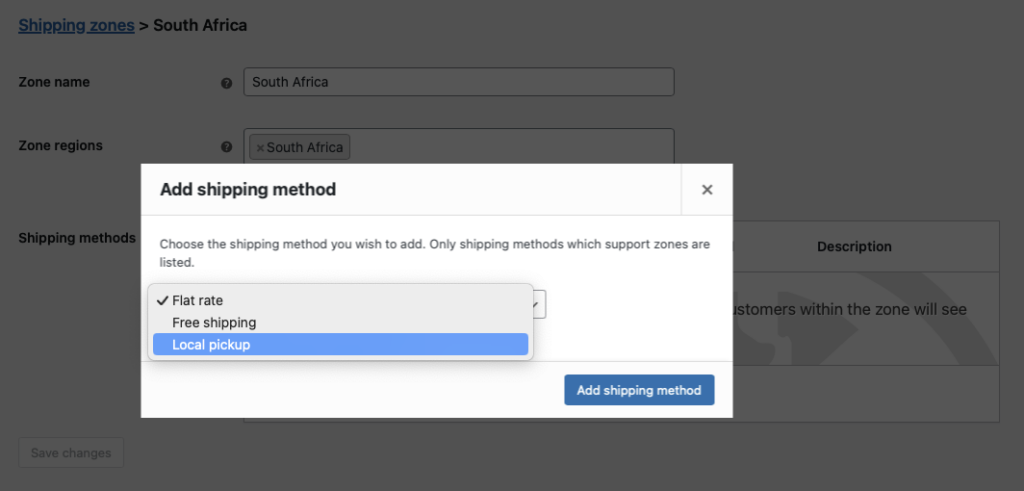
Allow customers to choose pickup or delivery at checkout using WooCommerce shipping methods:
- In the WordPress dashboard, go to WooCommerce > Settings > Shipping e clique em Adicionar zona de expedição.
- Enter a Zone Name (e.g., “Local Area”) and specify your restaurant’s region.
- Adicionar Recolha local as a shipping method for in-store collection.
- For delivery, select Envio gratuito ou Taxa fixa (e.g., rename Flat Rate to “Local Delivery” and set a $5 fee).
5. Configure Custom Order Statuses

Track order progress with custom statuses using a free custom order status plugin (e.g Ni WooCommerce Custom Order Status plugin). Install it and create statuses like:
- Ativo: Order is being prepared in the kitchen.
- Pronto: Order is ready for pickup or delivery.
- Completo: Order is fulfilled, and no further action is needed.
- Navegar para Order Status > Add New to set these up.
6. Set Up Automated Customer Emails and SMS (optional)
Next, you can send automated updates to your customers when the order status is changed, using the Plugin AutomateWoo extension. This can be used to let them know the order is ready for pickup, or out for delivery.
When an order status is changed, you can configure AutomatizarWoo enviará uma mensagem de correio eletrónico ao cliente. Pode configurar vários e-mails que são accionados por diferentes estados de encomenda e pode também aplicar regras adicionais para que os e-mails sejam enviados apenas quando determinadas condições são cumpridas.
Eis alguns exemplos dos tipos de automatização que pode implementar utilizando accionadores e regras:
Encomenda em preparação e-mail
When an order comes in, the kitchen marks it Ativo to show preparation has started in your ordering system. Configure AutomatizarWoo to email the customer on that status change, confirming the kitchen is working on their order. This sets expectations and keeps them informed of progress.

E-mail de encomenda pronta para recolha
Send this email only for Local Pickup orders. In AutomateWoo, add a Rule where Encomendar → Shipping Method = Recolha local so the workflow triggers only in those cases.
A encomenda está a caminho do e-mail
Send this email only for delivery orders. In AutomateWoo, add a Regra: Order → Shipping Method é Taxa fixa OU Envio gratuito (i.e., “is any of: Flat Rate, Free Shipping”).
Correio eletrónico de agradecimento
After the order is marked Complete, send a thank-you email with a coupon code to drive repeat sales.
Calendário/programação
In all of the above examples, you can leave the Calendário definição para Correr imediatamente a menos que pretenda aplicar um ligeiro atraso que lhe dê tempo para cancelar o envio de uma mensagem de correio eletrónico se o estado da encomenda tiver sido incorretamente alterado.

Acções
Para cada correio eletrónico, terá de configurar um correio eletrónico ou SMS text message.
- In your workflow, open Actions → Add action.
- Choose Enviar e-mail (or Send SMS if you use SMS).
- Conjunto Para para
{{ customer.email }}so it goes to the buyer. - Fill in the Assunto e Conteúdo do correio eletrónico (use merge tags as needed).
- Guardar the action.
If sending SMS instead, pick Send SMS and configure the recipient/message per your SMS setup.
Eis um exemplo:
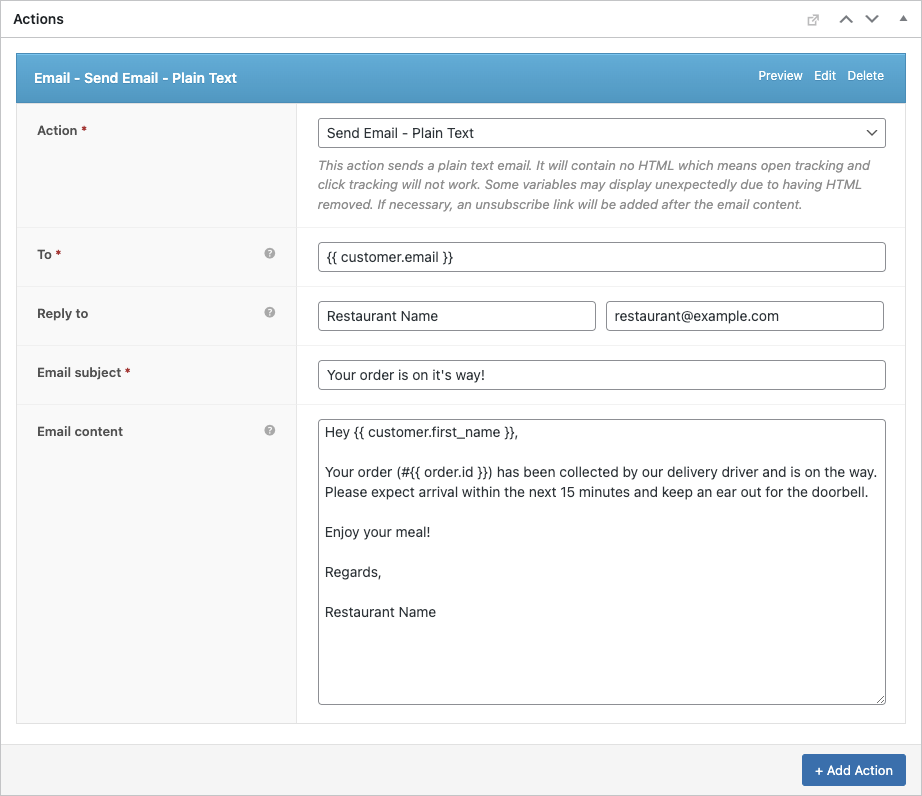
Com o tempo, isto poupará inúmeras horas e minimizará o risco de erro. Também é possível configurar AutomatizarWoo para enviar SMS utilizando Twilio que é outra grande caraterística deste sistema de encomendas para restaurantes.
6. Set Up FooSales POS
FooSales will work without any custom configuration, however you will need to configure what order statuses FooSales should load. Open FooSales → Settings → Orders and add your custom statuses under Estado das encomendas a carregar so they appear in the POS apps. Set the Estado de apresentação da encomenda to define what status is applied at checkout, and choose which statuses count as Incomplete order statuses.

O FooSales também pode ser configurado para mostrar alertas de encomenda com base no estado da encomenda ou no método de envio associado a uma encomenda. Os alertas de encomendas asseguram que o pessoal do piso ou da cozinha é informado das novas encomendas e pode atuar sem demora graças ao seu sistema de encomendas para restaurantes.

Using Your Burger Restaurant Ordering System
Here’s how to manage online and in-person orders with your system:
Encomendas online
- When a customer orders a customized burger online, the order appears in FooSales POS with an alert.
- View the order in the POS, including details like toppings (via Product Add-Ons), order ID, status, shipping method, and total.
- Change the status to Ativo to start preparation, triggering the “Order Being Prepared” email/SMS.
- Kitchen staff can view details on a tablet or print an order slip using FooSales’ thermal printer support.
- Update to Pronto when complete, notifying customers for pickup or delivery. For deliveries, drivers use order details for fulfillment.
- Set to Completo once the customer receives the order.
In-House Orders

- Use FooSales to create in-person orders on the FooSales POS.
- Search products (e.g., “Double Cheeseburger”) or scan barcodes, with topping customizations synced via WooCommerce Product Add-Ons.
- Add items to the cart, apply discounts or coupons, link to a customer profile, and select payment methods on the checkout screen.
- Set the order status to Processamento to notify kitchen staff.
- Orders are stored in WooCommerce, and inventory updates automatically.
Visualização de encomendas

- Online and in-person orders appear in the WooCommerce dashboard under Encomendas e na secção de encomendas do FooSales’.
- Use WooCommerce reports for sales and inventory analytics.
Conclusão
Setting up an ordering system with WordPress, WooCommerce, FooSales, and the Product Add-Ons extension equips your burger restaurant to handle online and in-person orders efficiently. This system streamlines customization, tracks orders, and enhances customer satisfaction with minimal cost. Sign up for a FooSales free trial to get started and optimize your restaurant’s operations.